Team-BuilderTeam Builder
Im Tab Team-Builder stehen unter „Verfügbare Links“ alle Links, bei denen beide Pokémon gefangen und am Leben sind.
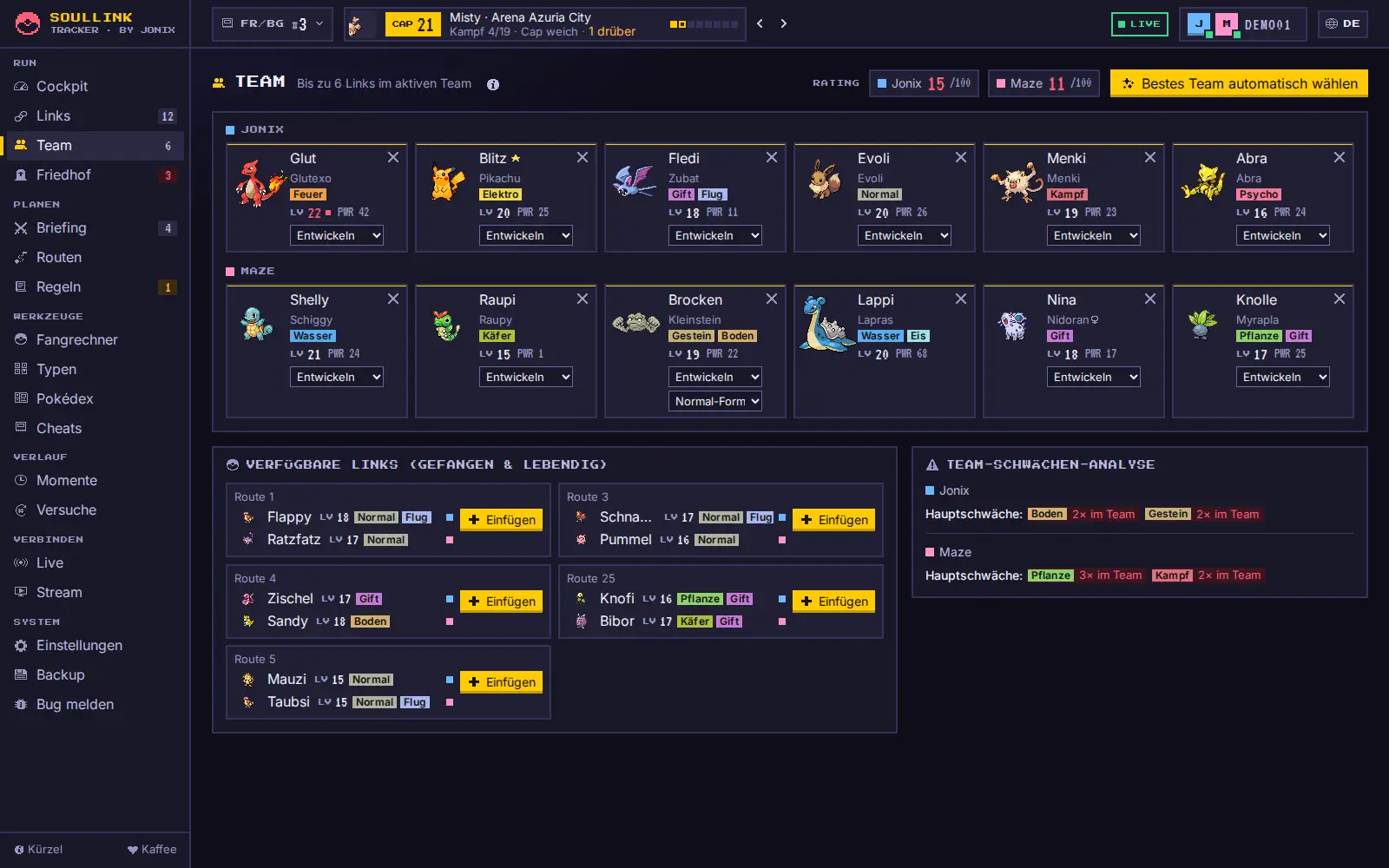
- Ziehe einen Link auf ein freies Feld oder klicke + Einfügen. Weil ihr verlinkt seid, füllt sich das gleiche Feld bei beiden Spielern.
- Am Touchscreen: Karte antippen, dann das freie Feld antippen.
- Bestes Team automatisch wählen ersetzt das Raster durch die sechs stärksten verfügbaren Links (mit Nachfrage).
- Die Team-Schwächen-Analyse zeigt geteilte Schwächen, zu viele gleiche Typen und ein Team-Rating aus Basiswerten und Balance.
In the Team Builder tab, “Available links” lists every link where both Pokémon are caught and alive.
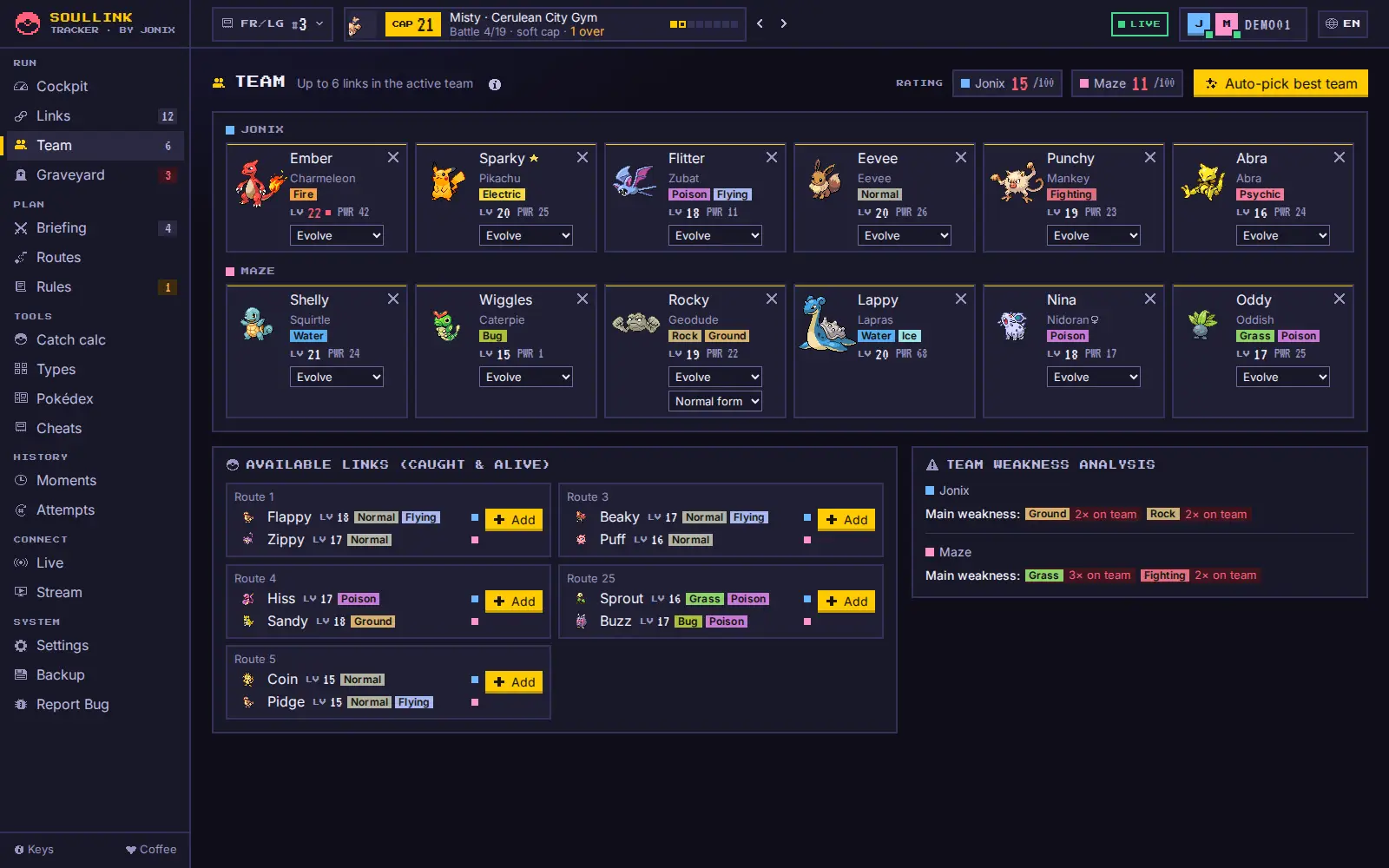
- Drag a link onto a free slot or click + Add. Because you are linked, the same slot fills for both players.
- On a touchscreen: tap the card, then tap the free slot.
- Auto-pick best team replaces the grid with the six strongest available links (with confirmation).
- The team weakness analysis shows shared weaknesses, too many of one type and a team rating based on base stats and balance.
Level-Caps & Cap-WächterLevel caps & cap guard
Der Cap-Chip in der Kopfzeile zeigt immer den Cap (das höchste Gegner-Level), den nächsten Kampf mit Trainer-Bild, den Orden-Fortschritt und wie viele Pokémon darüber liegen. Die kleinen Pfeile daneben springen zum vorigen oder nächsten Kampf, im Cockpit reicht ein Klick auf den Orden.
- Ein Klick auf den Chip öffnet die Details: die Level jedes Gegner-Pokémon, Zurück, Geschafft – Cap weiter und Kämpfe bearbeiten.
- Kämpfe bearbeiten öffnet die Liste als Dialog: Namen und Level anpassen, Kämpfe hinzufügen oder löschen. Für die meisten Editionen sind die Kämpfe schon hinterlegt.
- Der Cap-Wächter markiert Pokémon rot, deren Level über dem aktuellen Cap liegt – in der Links-Zeile, in der Team-Box und im Cockpit. Dafür trägst du das Level im kleinen Feld Lv. neben dem Pokémon ein.
- In den Details zeigt eine Plakette, wie streng euer Cap ist (CAP WEICH, CAP HART oder CAP AUS); ein Klick öffnet die Regeln.
- Der Knopf Briefing führt zum Kampf-Briefing für den aktuellen Kampf.
The cap chip in the header always shows the cap (the highest opponent level), the next battle with the trainer picture, badge progress and how many Pokémon are above it. The small arrows next to it jump to the previous or next battle; in the Cockpit, a click on the badge is enough.
- Clicking the chip opens the details: the level of every opponent Pokémon, Back, Cleared – next cap and Edit battles.
- Edit battles opens the list as a dialog: change names and levels, add or remove battles. For most editions the battles are already built in.
- The cap guard marks Pokémon red whose level is above the current cap – in the link row, in the team box and in the Cockpit. For that, enter the level in the small Lv. field next to the Pokémon.
- In the details a tag shows how strict your cap is (CAP SOFT, CAP HARD or CAP OFF); clicking it opens the rules.
- The Briefing button leads to the battle briefing for the current battle.
Regel-EngineRules engine
Im Tab Regeln (Gruppe RUN) legt ihr euer Regelwerk einmal pro Raum fest; es gilt für beide, und jede Änderung sieht dein Partner sofort. Drei Vorlagen helfen beim Start: Klassisch (Standard), Hardcore (alles an, auch Primärtyp-Regel und Typ-Link) und Locker.
| Regel | Was der Tracker tut |
|---|---|
| Dupes-Clause (an) | Eine Evolutionslinie, die schon zählt, bekommt die Markierung DUPE – weitersuchen. Einstellbar: zählen nur Gefangene oder alle Begegnungen, gilt pro Spieler oder für beide. |
| Species-Clause (aus) | Wie Dupes, aber nur für exakt dieselbe Art; Entwicklungen sind erlaubt. |
| Shiny-Clause (an) | Shinys dürfen immer gefangen werden – ein hebt die DUPE-Markierung auf. |
| Level-Cap (weich) | Weich: rote Markierung. Hart: zusätzlich eine Warnung beim Eintragen mit „Behalten“ oder „Auf Lv. … setzen“. Aus: keine Markierung. |
| Primärtyp-Regel (aus) | Im aktiven Team darf jeder Primärtyp nur einmal vorkommen – über alle Pokémon beider Spieler zusammen (im Nuzlocke: dein Team). Primärtyp ist der erste Typ der aktuellen Form, eine Alola-Form zählt also mit ihrem eigenen Typ. Bei einem Verstoß erscheint im Team-Builder eine rote Leiste, die betroffenen Team-Boxen werden markiert, und im Cockpit steht „! 1× Primärtyp doppelt“. Schon vor dem Einfügen zeigen die verfügbaren Links, welcher Primärtyp bereits im Team ist. |
| Typ-Link (aus) | Prüft nur die beiden Partner eines Links: Teilen sie einen Typ (auch den Zweittyp), erscheint TYP-KONFLIKT. Das ganze Team deckt die Primärtyp-Regel ab. |
| Spitznamen-Pflicht (aus) | Gefangene ohne Spitznamen bekommen SPITZNAME?. |
| Nur erster Encounter (an) | Zur Info: Der Tab weist auf doppelt eingetragene Routen hin. |
Der Tracker markiert nur – er verbietet nichts, ihr entscheidet. Die aktiven Regeln und Warnungen („! 1× Dupe“) stehen auch oben im Cockpit.
In the Rules tab (RUN group) you set your ruleset once per room; it applies to both of you and your partner sees every change right away. Three presets help you start: Classic (default), Hardcore (everything on, including the primary type rule and type link) and Casual.
| Rule | What the tracker does |
|---|---|
| Dupes clause (on) | An evolution line that already counts gets the DUPE flag – keep searching. Adjustable: counts only caught Pokémon or all encounters, applies per player or to both players. |
| Species clause (off) | Like dupes, but only for the exact same species; evolutions are fine. |
| Shiny clause (on) | Shinies may always be caught – a removes the DUPE flag. |
| Level cap (soft) | Soft: red highlight. Hard: additionally a warning when you enter the level, with “Keep” or “Set to Lv. …”. Off: no highlight. |
| Primary type rule (off) | Each primary type may appear only once in the active team – across all Pokémon of both players combined (in a Nuzlocke: your team). The primary type is the first type of the current form, so an Alolan form counts with its own type. On a violation the Team Builder shows a red bar, the affected team boxes are marked and the Cockpit shows “! 1× primary type twice”. Before you add a link, the available links already show which primary type is in the team. |
| Type link (off) | Only checks the two partners of a link: if they share a type (secondary type included), TYPE CLASH appears. The primary type rule covers the whole team. |
| Nicknames required (off) | Caught Pokémon without a nickname get NICKNAME?. |
| First encounter only (on) | For information: the tab points out routes entered twice. |
The tracker only flags things – it doesn’t forbid anything, you decide. The active rules and warnings (“! 1× dupe”) are also shown at the top of the Cockpit.
Kampf-BriefingBattle briefing
Der Tab Briefing (Gruppe PLANEN, Taste 5, oder über die Cap-Details in der Kopfzeile) bereitet euch auf den nächsten Arena-, Top-Vier-, Champion- oder Rivalenkampf vor. Weil im Soullink der Partner mitstirbt, bewertet er immer den ganzen Link.
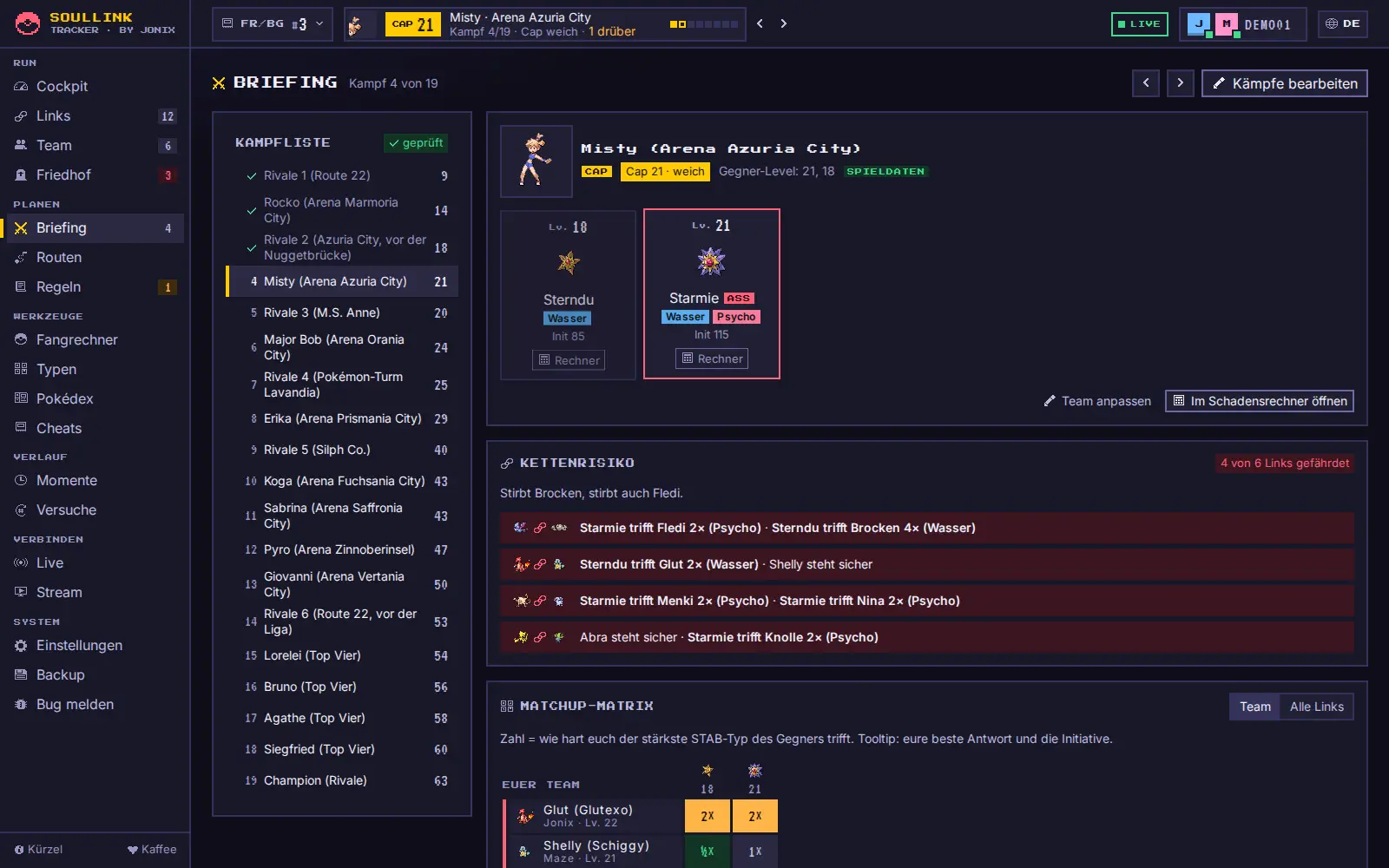
- Links steht die Kampfliste mit allen Kämpfen: geschaffte mit Haken, der aktuelle Cap-Kampf gelb markiert, rechts das Cap-Level. Ein Klick zeigt einen anderen Kampf, ohne den Cap zu ändern (auch mit den Pfeil-Knöpfen oben). In schmalen Fenstern wird die Liste zu einer Leiste zum Wischen.
- Kämpfe bearbeiten (oben rechts) öffnet die Kampfliste zum Anpassen.
- Gegner-Team mit Trainerbild, Leveln, Typen, Initiative und dem ASS (höchstes Level, rot umrandet). Bei Rivalen wählst du, welchen Starter euer Rivale hat.
- Kettenrisiko: wie viele Links gefährdet sind, z. B. „Stirbt Glut, stirbt auch Shelly.“, und je Link die konkrete Gefahr.
- Matchup: eure Links gegen jeden Gegner als Zahl – 4× rot, 2× orange, 1× neutral, ½× grün. Mit Team / Alle Links schaltest du zwischen Team und allen aktiven Links um. Fährst du mit der Maus über eine Zelle, siehst du eure beste Antwort und wer schneller ist.
- Sichere Antworten: Links, die gegen alle Gegner mindestens neutral stehen und selbst sehr effektiv treffen.
- Speed-Tiers: Basis-Initiative von euch und den Gegnern im Vergleich.
- Im Schadensrechner öffnen (unter dem Gegner-Team, bzw. Rechner an jedem Gegner-Pokémon): öffnet den Showdown-Schadensrechner im Browser, schon auf die richtige Generation gestellt, und kopiert das Gegner-Team im Showdown-Format (englische Namen, Level) in die Zwischenablage. Im Rechner auf Import klicken, einfügen, fertig – ein Team per Link übergeben kann der Rechner nicht.
Mitgeliefert sind die Teams für die Editionen der Generationen 1 bis 4. Für alle anderen Kämpfe (und für Randomizer oder ROM-Hacks) tragt ihr das Gegner-Team mit Gegner-Team eintragen bzw. Team anpassen selbst ein – es wird im Raum für euch beide gespeichert. Ist im Team-Builder noch kein Team gesetzt, wählt ihr die Links direkt im Briefing aus.
Ein rotes Warnzeichen mit Zahl am Knopf Briefing zeigt schon vorher, dass Links im aktuellen Kampf gefährdet sind. Bewertet werden nur Typen und Basiswerte, keine Attacken, Fähigkeiten oder Items.
The Briefing tab (PLAN group, key 5, or via the cap details in the header) prepares you for the next gym, Elite Four, champion or rival battle. Because your partner dies too in a Soullink, it always rates the whole link.
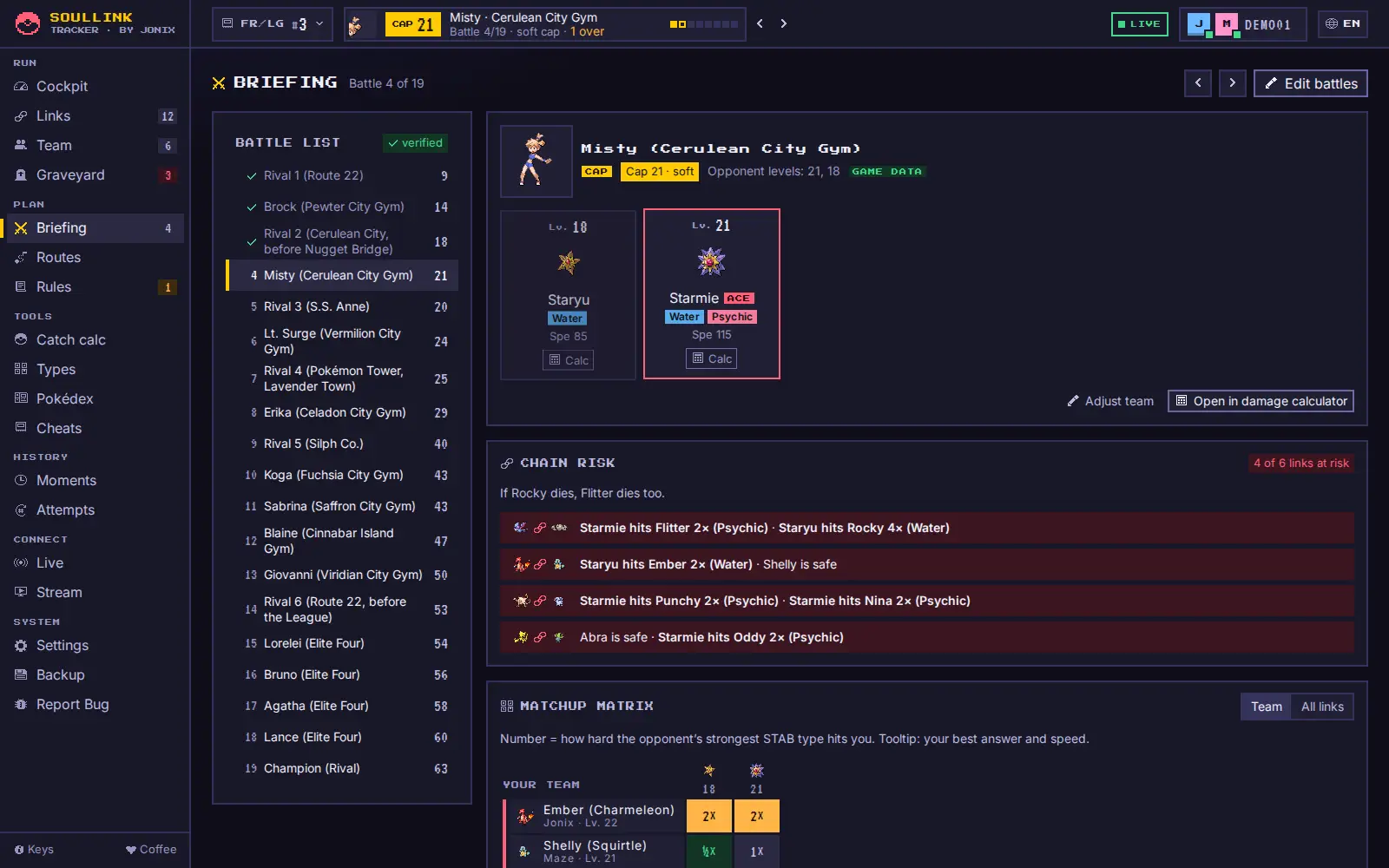
- On the left is the battle list with every battle: beaten ones with a check mark, the current cap battle marked yellow, the cap level on the right. A click shows another battle without changing the cap (the arrow buttons at the top do the same). In narrow windows the list becomes a strip you can swipe.
- Edit battles (top right) opens the battle list for editing.
- Opponent team with trainer picture, levels, types, speed and the ACE (highest level, red frame). For rivals you choose which starter your rival has.
- Chain risk: how many links are at risk, e.g. “If Charmander dies, Squirtle dies too.”, and the concrete danger for each link.
- Matchup: your links against every opponent as a number – 4× red, 2× orange, 1× neutral, ½× green. Team / All links switches between your team and all active links. Hover a cell to see your best answer and who is faster.
- Safe answers: links that are at least neutral against every opponent and hit super effectively themselves.
- Speed tiers: base speed of you and the opponents compared.
- Open in damage calculator (below the opponent team, or Calc on each opponent Pokémon): opens the Showdown damage calculator in your browser, already set to the right generation, and copies the opponent team in Showdown format (English names, levels) to the clipboard. Click Import in the calculator and paste – the calculator can’t take a team via link.
Teams are built in for the editions of generations 1 to 4. For every other battle (and for randomizers or ROM hacks) enter the opponent team yourself with Enter opponent team or Adjust team – it is saved in the room for both of you. If no team is set in the Team Builder yet, you pick the links right in the briefing.
A red warning mark with a number on the Briefing button tells you in advance that links are at risk in the current battle. Only types and base stats are rated, not moves, abilities or items.
Pokédex, Typentabelle & FangrechnerPokédex, type chart & catch calculator
- Pokédex: grün = Linie gefangen, gesperrt = angetroffen, aber nicht gefangen, frei = noch nirgends getroffen. Mit „Pokémon prüfen“ siehst du sofort, ob eine Begegnung noch zählt.
- Typentabelle: passend zur Generation eures Spiels (Gen 1 ohne Unlicht/Stahl, Fee ab Gen 6).
- Fangrechner: Fangchance pro Ball nach HP, Status und Situation – nur Bälle, die es in eurem Spiel wirklich gibt.
- Pokédex: green = line caught, locked = encountered but not caught, free = not met anywhere yet. “Check Pokémon” tells you instantly whether an encounter still counts.
- Type chart: matching your game’s generation (Gen 1 without Dark/Steel, Fairy from Gen 6).
- Catch calculator: catch chance per ball by HP, status and situation – only balls that actually exist in your game.